【GEEKOM A8】RX 9060 XT × Aoostar AG02でeGPU環境を構築する【前回レビュー撤回、うまくいった編】
PRこの記事にはアフィリエイト広告(Amazon)のリンクが含まれています。
この記事はシリーズの3本目です:①購入編 → ②構築&レビュー編(このときは認識せず) → ③この記事
結論
GEEKOM A8 ミニPCとの接続では、Aoostar AG02付属のUSB4ケーブルだと認識せず、別のケーブルに替えたら認識した。
うまくいかない人は、まず認証ケーブルに替えて試しましょう。
同じGEEKOM A8・RX 9060 XT・AG02(2台目)のまま、ケーブルだけTH3P4G3付属のもの(Thunderbolt 4の認証マーク付き)に替えたら動きました。AG02は2台とも、それぞれの付属ケーブル(計2本)で同じ症状だったので、ケーブル1本だけの初期不良とは考えにくい。ただ、付属ケーブルそのものの問題か、GEEKOM A8のUSB4との相性・信号条件の問題かまでは特定していません。
Aoostarのメールでも、最初に試す対策が Try a different USB4 cable (40Gbps certified). でした。
それなら最初から認証ケーブル付けてくれw
本体は、少なくとも2台目はケーブルを替えただけで動いた!! 安いしいいとおもう
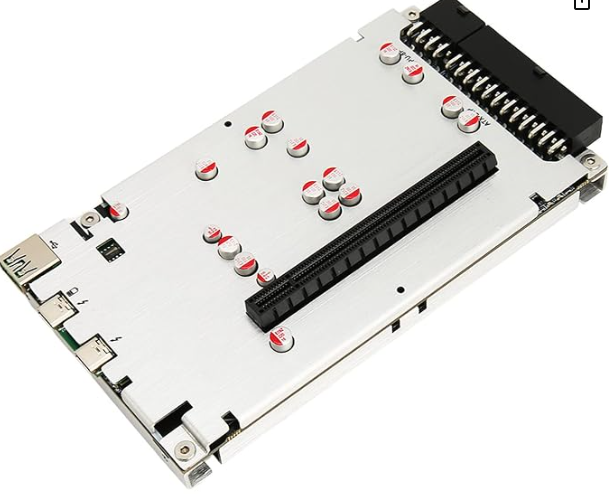
AOOSTAR AG02 eGPUドックドッキングステーション
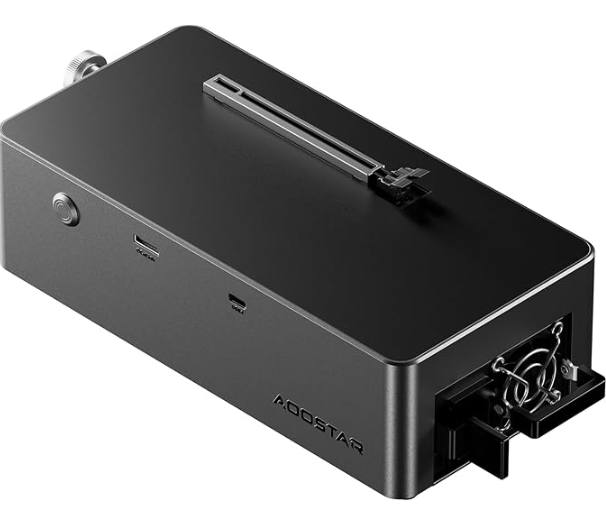
前回記事最後に紹介したeGPUドック「TH3P4G3」付属のThunderbolt 4認証品らしきケーブル(認証マークはついてる)をAG02とGEEKOM A8の間に使用したところ、何の問題もなくAG02に搭載しているRX 9060 XTを外部GPUとして認識できた。
TH3P4G3 ↓ こいつは全く問題でない、eGPUドックとして非常におすすめ。
TH3P4G3 グラフィックスドッキングステーション(Amazon)
【2026年9月追記】AG02は結局2台とも返品して、TH3P4G3を残しました
流れはこうです。
1. AG02の1台目を返品(付属ケーブルで認識せず)
2. 届いた2台目も、その付属ケーブルでうまくいかず
3. TH3P4G3のほうが安定してて信頼性が高いとネットで見かけて、Amazonのレビューからもそれが感じ取れたので、TH3P4G3を購入
4. TH3P4G3が届いたとき、AG02の2台目はまだ返品待ちで部屋にあったので、TH3P4G3付属のケーブルを試しにつないでみたら動いた(=この記事)AG02の返品をキャンセルしてもよかったんですが、やっぱりTH3P4G3のほうが安定してて信頼性が高いと判断して、こっちを残しました。電源とドックが分かれてるので、電源をこの先も使い回せるのもポイントです。
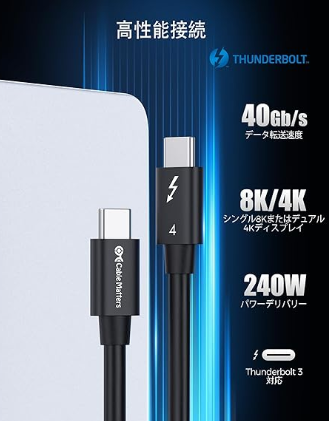
自分が使ったのはTH3P4G3付属のケーブルです。手元に認証ケーブルが無くて別に買うなら、Thunderbolt 4認証取得と明記されてるCable Mattersの 40Gbps Thunderbolt 4ケーブル 0.3m(できるだけ短いほうがよい)あたりが候補↓(このケーブル自体は自分では試していません)
Cable Matters Thunderbolt 4 ケーブル 0.3m(Amazon)
検証環境
PC:GEEKOM A8(AMD Ryzen 7 8745HS / Radeon 780M内蔵 / DDR5-5600 32GB / SSD 1TB / Windows 11 Pro)
eGPUドック:Aoostar AG02(800W電源内蔵)
GPU:SAPPHIRE PULSE Radeon RX 9060 XT 16GB
接続:USB4(AG02付属ケーブル → TH3P4G3付属のThunderbolt 4ケーブルに交換)
経緯
前回、2個目のAoostar AG02でも外部GPU認識がうまくいかず、AG02はだめでしょ、もう買わない、返品するといってましたが、
まだ返品しておらず部屋に置いていたところ
新しいeGPUドックのTH3P4G3が届きまして、その付属品のUSB Type-Cケーブル(Thunderbolt 4)を最後試しにAG02に使ってみた結果、
なんと、、何の問題もなく起動しちゃいました という(笑)
AOOSTAR AG02 eGPUドックドッキングステーション
以下、正常起動動画↓
Aoostarの見解
前回の記事で、Aoostarからの連絡が途絶えたと書きましたが、数日経ってようやく連絡がきました。
(前回の担当者が適切なサポートをせず申し訳ない とちゃんとメール冒頭に謝罪があった。)
Aoostarメールまとめ
原因の見立て
- 不具合(LED一瞬点灯後に即消灯)は、電源の故障や保護回路の作動ではなく、USB4の初期化(ハンドシェイク)の失敗の可能性が非常に高い。リンクが確立されないとAG02は即座に自動シャットダウンする仕様。
AMDミニPCで起きる理由
- AMDプラットフォームのUSB4はメーカーごとのバラつきが大きく、未認証の実装、不完全なファームウェア、信号強度の弱さ、高消費電力GPU(RX 9060 XT)との互換性の限界により、リンク確立に失敗しやすい。
- なお、OCuLink(PCIeネイティブ)ではこの問題は起きず、またAG02側に修正ファームウェアは存在しない(=AG02のファームウェアが原因ではない、という説明。PC側の相性か、ケーブルの品質か、それ以外かは、メール末尾でも「これから切り分けたい」と書いてあり、メーカーも特定はしていない)。
メーカー推奨の対策
- 認証済みの高品質なUSB4ケーブル(40Gbps)を使用する(AMDホストは極めて過敏なため)。 ←認証済みケーブルを付属してくれよ。。といってもコスト勝負している中華メーカーはこれをやる経済的メリットがないと判断して安価なケーブルを付属品にしてるのだろう。実際、メール内では、「付属ケーブルはほとんどのユーザーで動作する」と言ってる。
- 別のUSB4ポートを試す、またはPCのBIOS/USB4ファームウェアを更新する。
- 起動順序の変更:AG02通電 ➔ 3〜5秒待機 ➔ USB4接続 ➔ PC起動。
以下、原文のせておきます
(※メール中の「8845HS」は誤りで、使ってるのは Ryzen 7 8745HS です)
Hello,
Thank you very much for your detailed explanation, and I’m very sorry that my previous colleague did not continue assisting you properly.
Based on everything you described — especially the behavior where the AG02’s white LED flashes for only a split second and then immediately shuts off — this issue is very likely caused by a USB4 handshake failure between the AG02 and the host device.
This is not a PSU failure, and not an OVP/OCP trigger.
It is a USB4 initialization problem.
Why this conclusion?
From your description:
The AG02 LED turns on for less than one second
Then the dock immediately shuts itself off
After waiting several minutes (capacitors fully discharged), it sometimes works
When it does work, the GPU is detected perfectly and runs normally
The success rate is extremely low (around 5%)
This pattern is exactly what happens when the USB4 controller cannot complete the initial negotiation with the host. AG02 will not fully power on unless the USB4 link is successfully established.
If the handshake fails, the controller shuts itself down instantly — which matches your symptoms perfectly.
Why USB4 handshake failures happen (especially with AMD mini PCs)
USB4 on AMD platforms is still inconsistent across different manufacturers.
Many mini PCs use: Non‑certified USB4 implementations
Incomplete PD/Alt‑mode firmware
Weak signal integrity on the USB4 port
Limited compatibility with high‑power GPUs like RX 9060 XT
This causes:
Failed USB4 link training
Failed PCIe tunneling initialization
AG02 shutting down immediately because the host does not respond correctly
This is also why disconnecting all cables and letting the AG02 fully discharge sometimes allows a successful handshake on the next attempt.
Important clarification
Oculink/PCIe is a native protocol, so the dock works like a direct PCIe extension.
There is no firmware update available for AG02.
This means the issue is not caused by AG02 firmware.
What you can try next
Here are the most effective steps:
Try a different USB4 cable (40Gbps certified).
The included cable works for most users, but some AMD hosts are extremely sensitive.
Try a different USB4 port on the mini PC (if available).
Power‑on sequence:
Plug AC power into AG02
Wait 3–5 seconds
Then connect USB4 to the host
Finally power on the host
This sometimes stabilizes AMD USB4 negotiation.
Check if your mini PC has a BIOS or USB4 firmware update.
If possible, test AG02 with another USB4 host
(even a laptop)
This will confirm whether the issue is host‑specific.
If you can provide your mini PC model
If you tell me the exact model name of your AMD 8845HS mini PC,
I can check:
Whether its USB4 implementation is stable
Known compatibility issues
Whether other users reported the same behavior
Whether the manufacturer has a USB4 firmware patch
This will help us determine whether the problem is:
Host USB4 compatibility
Cable quality
Or something else
I will continue supporting you until the issue is fully resolved.
Aoostarさん、良い担当者に当たれば?誠実なチャットサポート対応があるのかも。